Creating your own page templates
Do you have pages that are often structured in the same way and are you looking for a simple way to create them?
You can create your own page templates!
To do this, go to ‘Special page’ and look for the ‘Page templates’ section. All existing page templates are listed there. You can simply insert a new or existing page here and edit it as usual. This will then appear in the ‘New page’ dialogue and can be reused as often as you like.
Is text from Word and similar programmes not displaying correctly?
If you copy text from Word or other websites and paste it into the text field, it may not display correctly.
This text often contains hidden HTML elements, which are copied along with it and can cause unwanted effects when the page is viewed.
You can copy such text into a simple text editor as an intermediate step and then copy it from there into additor. This removes the unwanted formatting and ensures everything is displayed in the desired, predefined layout.
Bypass the anti-spam feature
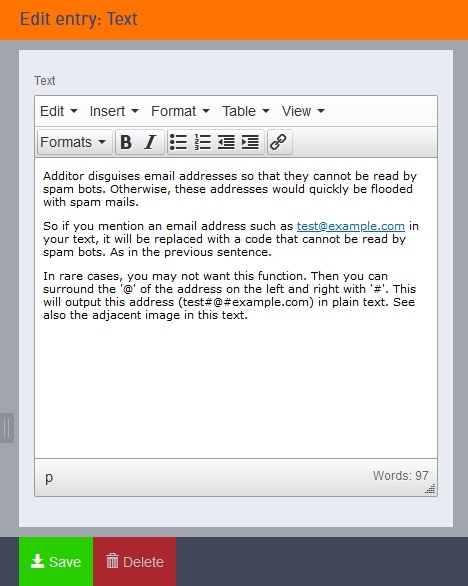
Additor masks email addresses so that they cannot be read by spam bots. Otherwise, these addresses would quickly be inundated with spam emails.
So, if you mention an email address such as [Bitte aktivieren Sie Javascript] in your text, it will be replaced with a code that spam bots cannot read. Just as in the previous sentence.
In rare cases, you may not want this feature to apply. In that case, you can surround the ‘@’ symbol in the address with ‘#’ symbols on either side. This ensures that the address (test@example.com) is displayed in plain text. See also the image accompanying this text.
How large can videos be? (File size)
There is actually no limit when using additor/xpedeo, but the data has to be transferred via the internet and possibly via a mobile connection, so it should be as small as possible. This helps to reduce waiting times for users.
There are a wide variety of video editing programmes available for optimising the size of a video. There can be significant differences in the compression of MP4 videos.
In our experience, we have often been able to reduce the size of MP4 videos – without any visible loss of quality – to 50 per cent or less of their original size using, for example, the open-source tool HandBrake (handbrake.fr).
There may be a restriction when uploading the video file to your server. This is due to a technical limit on file size set by the server provider. This can be adjusted if necessary. The maximum file size can be set below the upload field.
How big can videos be? (Height, width)
Videos are automatically displayed to the full width of the column they are in. You can therefore upload videos of any size.
However, ideally, the video should be roughly the same size as the column. If it is too small, the display quality will suffer. If it is too large, the video will take longer to load.